

How to Pause a Coffee Subscription: Step-by-Step
Table of Contents
- How to Pause a Coffee Subscription: The Quick Version
- Step 1: Sign In and Open Your Subscription Account
- Step 2: Select the Subscription You Want to Change
- Step 3: Choose Your Pause Length and Restart Date
- How to Skip a Coffee Subscription Delivery Instead of Pausing
- Pause or Cancel Coffee Subscription: Which One Saves You More
- Billing Cutoffs, Confirmation, and Common Mistakes
- How to Restart a Paused Coffee Subscription
- Frequently Asked Questions
Last Updated: October 5, 2026
How to Pause a Coffee Subscription: The Quick Version
You can pause a coffee subscription in about two minutes, and the exact phrase for it is just that: pause coffee subscription.
This guide from Sexy Barista walks through each step in order.
A quick note on why this matters.
Below, we'll show you exactly how to pause a coffee subscription, when to skip instead, and how to restart without losing your place.
Pause, Skip, Delay, or Cancel: What Each One Actually Does
These four words get used interchangeably. They are not the same thing, and mixing them up is the most common reason people get charged when they expected a break.
- Pause: Stops all deliveries for a set period. Your subscription stays active and restarts on your chosen date.
- Skip: Cancels one scheduled order. Your subscription keeps running and the next delivery arrives as normal.
- Delay: Pushes your next delivery back by a week or two. Useful for travel, not for long breaks.
Step 1: Sign In and Open Your Subscription Account
Start by signing in to your coffee subscription account.
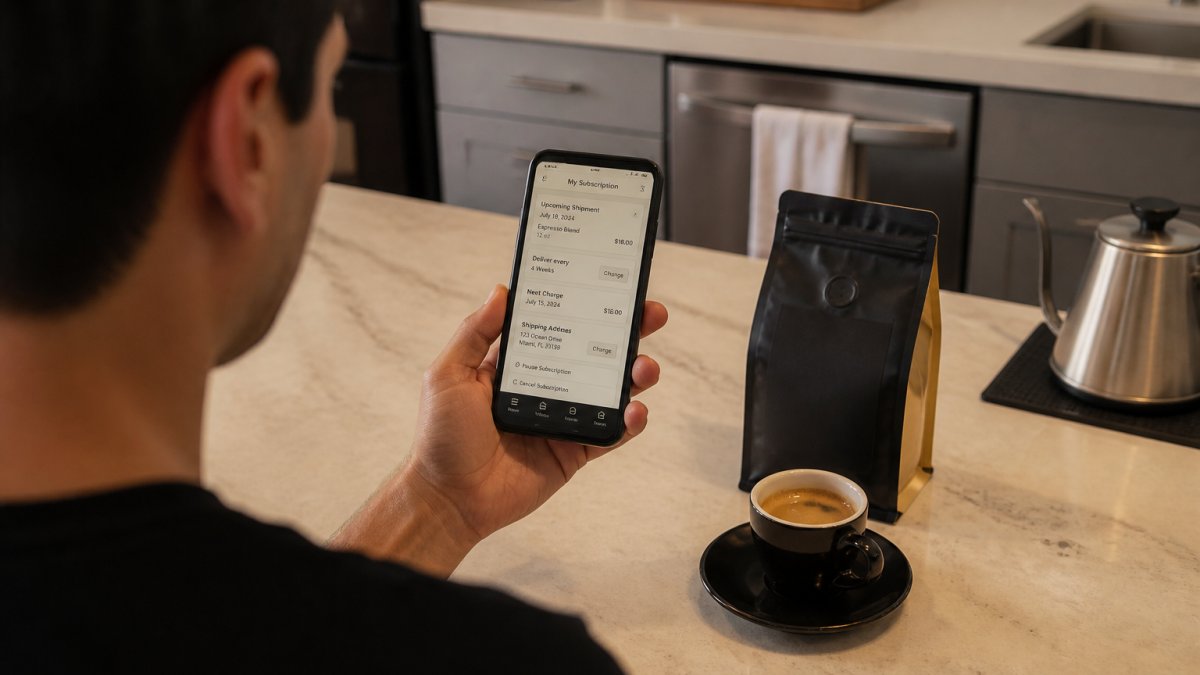
If you can't remember your password, use the reset link. Most providers send a confirmation email within a few minutes.
Once you're in, look for a tab labeled Subscriptions, Manage Subscription, or Subscription Settings. That's where every control lives.
Can't find the login page? Search your inbox for your last order confirmation.
Step 2: Select the Subscription You Want to Change
Your dashboard may show more than one active subscription. This happens if you've ordered different roasts or set up separate delivery schedules.
Click the subscription you want to change. Check the details before you touch anything:
- Next delivery date: confirms which order you're about to affect
- Delivery frequency: weekly, biweekly, or monthly
- Order status: shows whether the order is still editable or already processing
- Billing cycle: tells you when the next charge hits
If the status says "processing" or "shipped," you're too late for this cycle. Pause will apply to the following delivery instead. More on that below.
Step 3: Choose Your Pause Length and Restart Date
Now for the actual pause coffee subscription step. Click the Pause button, then choose a pause duration.
Most providers offer preset windows: two weeks, one month, two months, or three months. Some let you pick an exact restart date.
Set your restart date based on when you'll actually need coffee again, not when you think you should. If you're unsure, pick a shorter pause.
After you confirm, look for a confirmation message on screen and a confirmation email. No email means the pause probably didn't save. Go back and check.
How to Skip a Coffee Subscription Delivery Instead of Pausing
Skipping is the better move when you only need to miss one delivery. You're traveling for a week, you still have half a bag left, or a big order is already on the way.
The steps are nearly identical to pausing:
- Sign in and open your subscription account
- Select the active subscription
- Find the upcoming order on your delivery schedule
- Click Skip or Skip This Delivery
- Confirm the change
Your subscription stays active, your delivery frequency stays the same, and the next scheduled order arrives as planned.
So when should you skip instead of pause? Use this rule:
| Situation | Best Option | Why |
|---|---|---|
| One week of travel | Skip | Only one order affected |
| Pantry already full | Skip | Keeps your schedule intact |
| Two-month break | Pause | Stops multiple deliveries |
| Switching roasts | Skip | Buys time to choose |
| Done for good | Cancel | No future charges |
Pause or Cancel Coffee Subscription: Which One Saves You More
The honest answer: it depends on what your subscription is actually worth to you beyond the coffee. Pausing and canceling both stop deliveries, but they affect four things differently, your discount, your loyalty perks, your restart cost, and your pricing lock. Here's how to think through each.
Discounts and subscriber pricing
Many coffee subscriptions price recurring deliveries below one-time orders, a standing subscriber discount that applies automatically at checkout. Pausing usually preserves that discount because the subscription stays active; canceling usually ends it. When you rejoin after canceling, you may be quoted current pricing rather than the rate you originally locked in. If your provider has raised prices since you joined, canceling can quietly cost you more on the way back in.
Loyalty perks and rewards
Some programs accrue rewards per delivery, per dollar spent, or per consecutive month subscribed. A pause typically freezes accrual rather than resetting it, you stop earning during the break, but you don't lose what you've banked. Canceling is different: many programs expire or forfeit accrued rewards after a set period of inactivity, and a canceled account may restart at zero.
Restart fees and re-enrollment
A minority of providers charge a reactivation fee, require a minimum commitment on rejoin, or place returning customers into a new-customer queue. Pausing avoids all three. If your provider charges nothing to restart and honors your original rate, the financial difference between pausing and canceling narrows to almost nothing, and the decision becomes about intent, not money.
The decision rule
- Pause if you'll want coffee again within a few weeks or months, and you want to keep your discount, rewards, and pricing.
- Skip if you need to miss exactly one delivery and want your schedule untouched.
- Cancel if you're switching providers, stopping for good, or your provider charges nothing to restart and you'd rather not carry an active subscription.
A quick way to compare the two
Before you cancel, answer three questions:
- Does my subscriber discount survive a cancel-and-rejoin, or do I come back at full price?
- Do my accrued rewards expire if the account is inactive?
- Is there a restart fee, minimum order, or new-customer wait?
If the answer to all three is "no impact," canceling and pausing cost about the same, pick based on whether you plan to return. If any answer is "yes," pausing is almost always the cheaper path.
Billing Cutoffs, Confirmation, and Common Mistakes
Timing is everything here, and most guides gloss over it. Here's the mechanism: coffee subscriptions typically run on an automatic renewal cycle, and the charge fires a set number of days before the roast-and-ship date, often 24 to 72 hours ahead, though the window varies by provider. Once that charge clears, the order enters fulfillment and is effectively locked. Pause before the cutoff and no charge is triggered.
How to find your cutoff and next charge date
Before you click pause, open the subscription detail page and locate these three fields:
- Next charge date (sometimes labeled "Next billing date" or "Renews on")
- Next delivery date (sometimes a few days after the charge)
- Order status, "Active," "Scheduled," "Processing," or "Shipped"
If the status reads "Processing" or "Shipped," the order is already in motion. A pause won't recall it. If it reads "Scheduled" or "Active" and today is before the next charge date, you have room to act.
Can a pending order still ship after you pause?
Yes, and this is the single most common surprise. A pause stops future renewals, not an order that has already been charged or handed to fulfillment. If you see a charge you didn't expect after pausing, check the order history: it's almost always the order that was already processing when you hit pause. The fix is to pause earlier next cycle, not to dispute the charge.
Confirmation and verification checklist
A pause that didn't save is worse than no pause, because you'll assume you're covered. Run this check every time:
- On-screen confirmation. Look for a banner or toast that says the pause was applied, with the restart date shown.
- Confirmation email. Most providers send one within minutes. If it hasn't arrived in 15 minutes, check spam, then assume it didn't save.
- Dashboard status. Reload the subscription page. The status should now read "Paused," "On hold," or "Snoozed", not "Active."
- Next delivery date. It should be blank, or pushed to your chosen restart date. If it still shows the original date, the pause didn't take.
- Next charge date. Same check, it should be cleared or moved.
- Screenshot or save the confirmation. If a shipment arrives anyway, this is your evidence for a support request.
Common mistakes
- Pausing after the billing cutoff. You'll get one more delivery. Check the next charge date first.
- Assuming the pause saved because the button clicked. Always verify in the dashboard and via email.
- Forgetting the auto-resume date. Set a calendar reminder for the day before your restart date.
- Pausing when you meant to skip. You'll lose deliveries you actually wanted.
If the pause option is unavailable
Some accounts don't show a pause button, usually because the plan is prepaid, the subscription is in a trial, or the provider only offers skip and cancel. In that case, your options are to skip individual deliveries (which achieves a similar result for short breaks) or contact support and ask them to place the account on hold. Support can often apply a hold manually even when the self-serve option is hidden.
How to Restart a Paused Coffee Subscription
Restarting is easier than pausing. Sign in to your account, open the paused subscription, and click Resume or Reactivate Subscription.
Then confirm three things:
- Your next delivery date
- Your delivery frequency
- Your payment method on file
If your card expired during the pause, update it before you resume. A failed charge can delay your first order back.
Want to change things up when you return? If you've been drinking Cattivo, our medium-roast Guatemalan with tangerine and toffee notes, a restart is a good excuse to try Mamiami, a smooth Colombian with citrus and brown sugar, or Loosey Goosey, our syrupy Bali roast with baker's chocolate and vanilla.

Frequently Asked Questions
Is there a way to pause a subscription without canceling it?
Yes. Most coffee subscriptions, including Sexy Barista's, let you pause from your account dashboard without ending the plan. You keep your subscription details, your pricing, and any recurring discount intact, and nothing ships or charges while the pause is active. Canceling, by contrast, closes the subscription entirely, so you would have to set it up again from scratch. Pausing is the better choice for a vacation, a pantry that is still full, or a short break in your routine.
Can I skip just one coffee subscription delivery?
Skipping works well when you only need to miss a single shipment. Instead of pausing the whole plan, open your subscription settings, find the upcoming order, and skip that one delivery. The next charge moves to your following scheduled date and your delivery frequency stays the same. If you need to miss two or more deliveries in a row, a pause is usually simpler than skipping each order one at a time.
How long can you pause a coffee subscription?
Pause length depends on the provider. Many subscriptions offer preset windows, such as one, two, or three months, while others let you pick a specific restart date. Check your subscription settings for the available pause lengths before you confirm, and note that some plans automatically resume once the pause window ends. If you need longer than the maximum, contact customer support to ask about extending it.
Will pausing a coffee subscription stop the next order?
It stops the next order only if you pause before the billing cutoff for that shipment. Once an order is processing, it usually ships and charges as normal, and your pause takes effect on the following delivery. Check your order status right after pausing: if the next charge still shows as scheduled, that order is already in motion. Pausing at least a few days before your next delivery date avoids the problem.
Running low on coffee and juggling a full schedule is a bad combination. Sexy Barista makes subscription management simple: pause, skip, swap, or cancel whenever you need, with 10% off every recurring delivery and free shipping on orders $60 or more. Get started with Sexy Barista and keep your morning ritual fresh, flexible, and entirely on your terms.


Leave a comment
This site is protected by hCaptcha and the hCaptcha Privacy Policy and Terms of Service apply.